learnCharacters
Same AI character, older or younger: which traits to keep and which to rewrite
How to show a series character as a child or thirty years older without losing who they are: the lines to freeze, the lines to rewrite, one sheet per age, and the cost.
by reeldouble · November 6, 2026 · 6 min read
Aging a made-up character is a different job
Search for this and page one of Google is about photos: upload a picture of yourself and get a timelapse of your face at 80, or a baby-to-adult reveal. Kapwing and Dreamina both have guides for it.
A series character is a different problem. Nobody has a photo of your hero at age nine, because your hero does not exist. You need a flashback in episode six, or an epilogue thirty years on, and the viewer has to know in under a second that the child or the old woman is the same person they have been watching. That depends on what you carry over, and almost nobody writes about that part.
Runway's guide on consistent characters says the honest thing: aging is harder than ordinary consistency because you are changing features on purpose. Lensgo's guide puts a number on it, saying one locked reference holds about two to three years of change and a bigger jump needs a new reference set. We have not measured that figure ourselves. It matches how we work anyway: one sheet per age, and no sheet stretched across decades.
Recognition comes from a few traits
People recognise a character from a handful of traits, and most of them do not change with age. Before you make the new version, sort the character's descriptor block into two lists.
Freeze these. They carry identity across ages:
| trait | why it carries |
|---|---|
| eye colour and eye shape | barely changes from childhood to old age |
| face shape | the jaw softens or sharpens, but round stays round |
| signature colours in the outfit | a viewer reads colour before detail |
| signature prop | a locket, a scarf, a tool; the fastest cue there is |
| a scar, freckles or a birthmark | a fixed mark that says "same person" |
Rewrite these. They are what age actually changes:
| trait | child | older |
|---|---|---|
| hair | colour of youth, simpler cut | grey or white, thinner, a cut that suits the era |
| skin | smooth, rounder cheeks | lines around the eyes and mouth |
| build and height | shorter, larger head for the body | posture, a slight stoop or a heavier frame |
| clothing cut | sized and styled for a child | same colours, older cut |
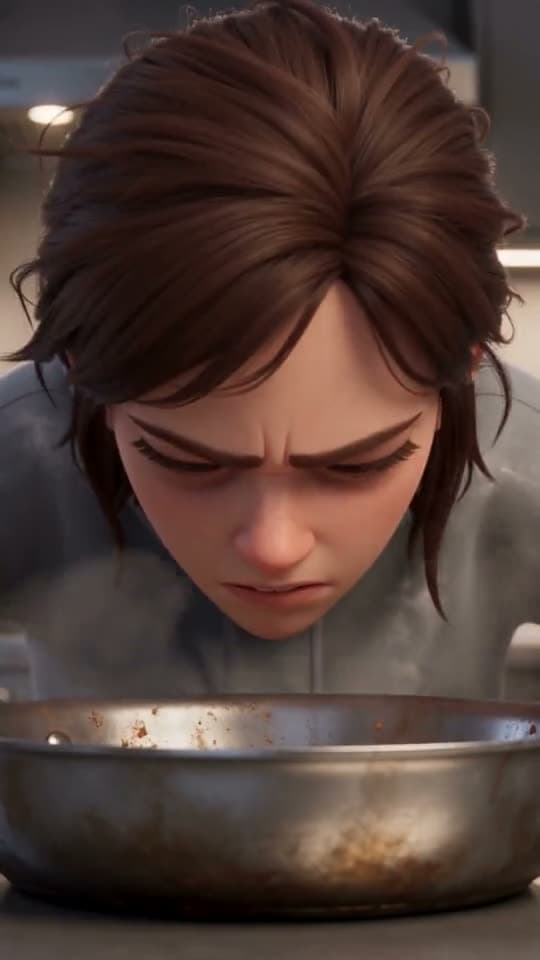
The cover frame shows why the frozen list works. She is a 3D animated character we rendered on 5 November 2026: short swept silver hair, blue eyes, a navy zip-up collar. The same character walks through a diner in another of our renders from that day, in a navy zip jumpsuit, and the navy zip and the silver hair are what make the two frames read as one person. If we aged her down, the navy and the blue eyes would stay. The silver hair would be the first thing to go.
Step 1: make a sheet for each age
Do not edit the original sheet and do not rely on the words "as a child" in the prompt. Words alone ask the engine to invent a younger face on the spot, and it will invent a slightly different one every shot.
Instead, make a new reference sheet for each age, using the original sheet as the reference and the rewritten descriptor block as the prompt. In our studio a character sheet costs 30 credits. Then save the new version as its own character with a clear name, such as "Mara, age 9" or "Mara, age 70". From then on, every flashback scene calls the child version, and the child looks the same in episode six as in episode eleven.
Our page on the character descriptor block covers how the block is written. For aging, change only the lines on the rewrite list. Every frozen line stays word for word, in the same order.
Step 2: change age at a cut
A shot where a child grows into an adult on screen is a morph effect, and identity is what it gives up first. For a series, the age change belongs at a cut: the older character looks at an old photo, cut, the child. The same rule applies to outfits, as we cover in changing a character's outfit.
If you want the on-screen morph as a deliberate effect, that is the first-and-last-frame method with the child sheet as the first frame and the adult sheet as the last. Keep it short and use it once, as an effect.
Step 3: both ages in one scene
A flashback sometimes puts the older and younger versions in the same frame, a woman watching her younger self. The engine treats them as two characters, so count slots:
| engine | references per scene | both ages in one shot |
|---|---|---|
| Kling O3 Pro | 5 elements | yes, two of five |
| Seedance 2.5 | 30 images | yes |
| Seedance 2.0 and 2.0 Fast | 9 images | yes |
| Veo 3.1 Fast | 3 images | yes, two of three, and the render is always 8 s |
Give each version its own reference and its own token in the prompt. Our guide on two characters in one scene covers how to keep them from blending.
What aging a character costs
| item | credits |
|---|---|
| child sheet | 30 |
| older sheet | 30 |
| 4 s silent test of each on Kling O3 Pro, 96 each | 192 |
| both ages, ready for a series | 252 |
A test shot is a 4-second silent render of the new version alone, so you can check the face against the original before you put it in an episode. If the test drifts, the fix is usually the sheet, a frozen trait that slipped, and another sheet is 30 credits. Compare that with a 30-second flashback at 720p on Seedance 2.5, which is 2,100 credits. Fixing the sheet first is the cheaper order.
When you have sorted the block into frozen and rewritten lines, make the new sheet in the studio and render one 4-second test before the flashback goes into an episode.
FAQ
How do I make an AI character look older but still the same person?
Keep the traits that do not change with age: eye colour and shape, face shape, signature colours, a signature prop and any scar or mark. Rewrite only hair, skin, build and clothing cut. Make a new reference sheet for the older version from the original sheet; on ReelDouble that costs 30 credits.
Can I show a younger version of my AI character in a flashback?
Yes. Make a child sheet from the adult sheet, rewriting only the age-related lines of the description, and save it as its own character, such as "Mara, age 9". Every flashback then calls the same child, so the younger version stays consistent across episodes.
Should I age an AI character with a prompt or a new reference image?
Use a new reference image. A prompt like "as a child" makes the engine invent a younger face in every shot, and each one comes out slightly different. A saved sheet per age gives every scene the same picture to copy.
Can the older and younger versions be in the same AI video shot?
Yes. The engine treats them as two characters. On ReelDouble that is two of five elements on Kling O3 Pro or two of three images on Veo 3.1 Fast, where a reference render is always 8 seconds.
How much does it cost to age an AI character?
On ReelDouble, a child sheet and an older sheet are 30 credits each, and a 4-second silent Kling O3 Pro test of each is 96, so both ages are ready for a series for 252 credits.